
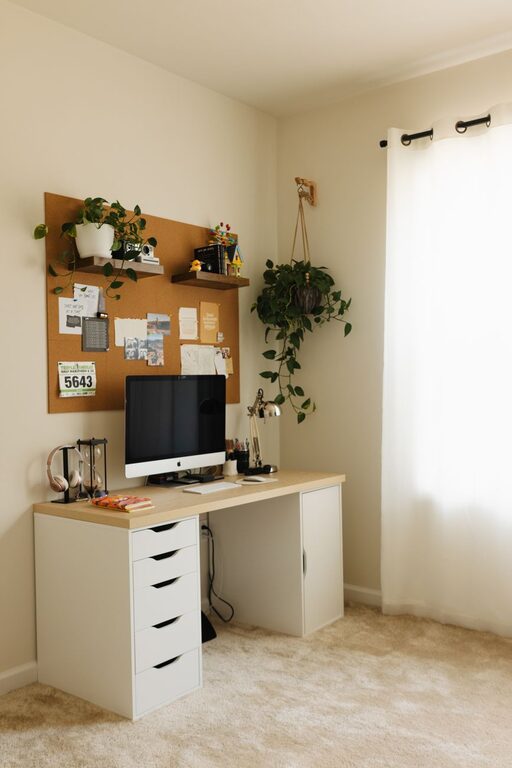
Creating a relaxing home workspace is essential for maintaining focus, reducing stress, and increasing productivity, especially when you spend long hours working from home. A thoughtfully designed environment can enhance your mood and motivation, making work feel less like a chore and more enjoyable. Whether you’re setting up a new office or refreshing your current space, these tips will help you create a calm and inviting workspace tailored to your needs.
Choose the Right Location
Find a Quiet Spot
Start by selecting a location in your home that is as quiet and free from distractions as possible. A corner of a spare room, a nook by a window, or even a section of your living room can work well if it’s away from household noise and foot traffic.
Consider Natural Light
Natural light boosts mood and energy levels. Position your desk near a window if possible, but be mindful of glare on your screens. Use light curtains to diffuse direct sunlight.
Optimize Your Desk and Chair Setup
Ergonomic Furniture Matters
Invest in a comfortable, adjustable chair that supports your back and promotes good posture. Pair it with a desk at the right height to avoid strain on your wrists and shoulders.
Keep Essentials Within Reach
Organize your desk so that frequently used items—like your computer, notebook, and pens—are easily accessible without cluttering your workspace.
Declutter and Organize
Minimalism Reduces Stress
Keep your workspace tidy by removing unnecessary items. A clean desk can help clear your mind and improve focus.
Use Storage Solutions
Incorporate shelves, drawers, or desk organizers to store papers and office supplies neatly. Label storage containers for easy retrieval.
Personalize Your Space
Add Greenery
Plants not only improve air quality but also create a calming atmosphere. Choose low-maintenance plants like succulents or spider plants.
Include Personal Touches
Decorate with items that inspire you, such as artwork, photos, or meaningful objects. A few well-chosen items can make the space feel welcoming without causing distraction.
Control Lighting and Sound
Use Layered Lighting
Combine ambient overhead lighting with task lamps to create a well-lit workspace, reducing eye strain during late hours.
Consider Sound Management
If background noise is an issue, try noise-canceling headphones or a white noise machine. Soft instrumental music can also promote relaxation and concentration.
Manage Temperature and Air Quality
Maintain Comfortable Temperature
Keep your workspace at a comfortable temperature. Use a fan, heater, or open a window to regulate airflow as needed.
Improve Air Quality
Good ventilation reduces fatigue and increases alertness. If possible, open windows or use an air purifier to keep the air fresh.
Establish a Routine and Break Areas
Designate Work Hours
Set clear start and end times to separate work from personal life. This helps prevent burnout and maintains a healthy work-life balance.
Create a Relaxation Spot
If space allows, set up a small area for breaks with a comfortable chair or cushions. Use this spot to stretch, meditate, or simply rest your eyes.
Incorporate Technology Wisely
Use Tools to Enhance Focus
Install apps or software that block distracting websites during work hours. Keep your devices charged and cables organized to avoid clutter.
Maintain Screen Comfort
Adjust your monitor height so it’s at eye level and use blue light filters to reduce eye fatigue, especially if you work late.
Final Thoughts
A relaxing and efficient home workspace doesn’t have to be expensive or complicated. By paying attention to lighting, ergonomics, organization, and personal comfort, you can create an environment that supports both productivity and well-being. Remember that the goal is to build a space that feels inviting and helps you maintain balance throughout your workday.
Try implementing these tips one step at a time and observe what changes make the biggest difference in your comfort and focus. A well-designed home workspace is an investment in your daily happiness and professional success.